



While most of the DevOps movement, practices and concepts emerged between 2007 and 2009 with the Devopsdays, and brought huge improvements for the software development lifecycle, a big question mark is still floating above the ABAP development. What can we do in terms of DevOps for SAP? Can we harness the benefits of regular DevOps practices? In this blog post I’m addressing what you should and should not expect from DevOps in an SAP environment.
For doing so, I’m separating the content into a few blog posts. This one fully addresses the DevOps concept for ABAP and a few other software development practices inside SAP. And in a few future blog posts I’ll address what can be made in terms of DevOps around SAP.
For DevOps inside SAP, there are three different stacks to approach: 1) SAP ABAP on ECC development, 2) Fiori and ABAP Development on S4/HANA, and 3) BTP Development.
To simplify the comparison, we’ll cover them looking for some key common components of a DevOps pipeline:
- Pipelines (do we have them?)
- Automated testing (unit and integration)
- Code scanning
- Blue/Green and/or Canary strategies supported
Stack 1 — SAP ABAP on ECC
This is the oldest way of developing ABAP applications and doesn’t allow the most important practices when talking about DevOps. The flow is very simple:
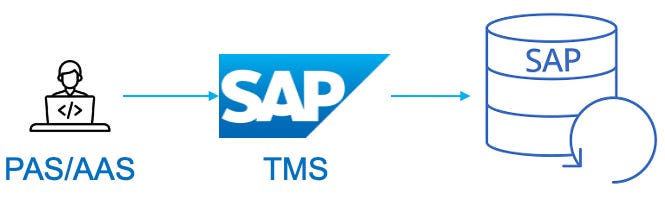
On the left, developers will develop the code inside one of the Application Servers, and TMS (Transport Management System) takes care of saving the code to the database and promoting it between environments. In this scenario there is no official support for Git. A few highlights:
- Code is stored on the database
- Doesn’t work with gCTS (more on gCTS on stack 2)
- No mature DevOps capabilities like deployment strategies, code scanning, etc.
In case DevOps is a must for your environment and you’re open to some risk, there is abapGit, which is not supported by SAP, and is a community-drive alternative so you can use Git for development inside ECC.
On this scenario you can create automated tests, but you won’t have a pipeline to run them automatically at every deployment.
Stack 2 — SAP S4/HANA with Fiori
When we have S4/HANA to work with, a few new possibilities open up. In this stack we’re adding SAP Fiori as a component to our frontend. Fiori was created to give more flexibility to frontend applications and is much newer than SAP core. Fiori allows the creation of web and mobile apps, providing the UX required by modern applications. So let’s take a look at the two flows:
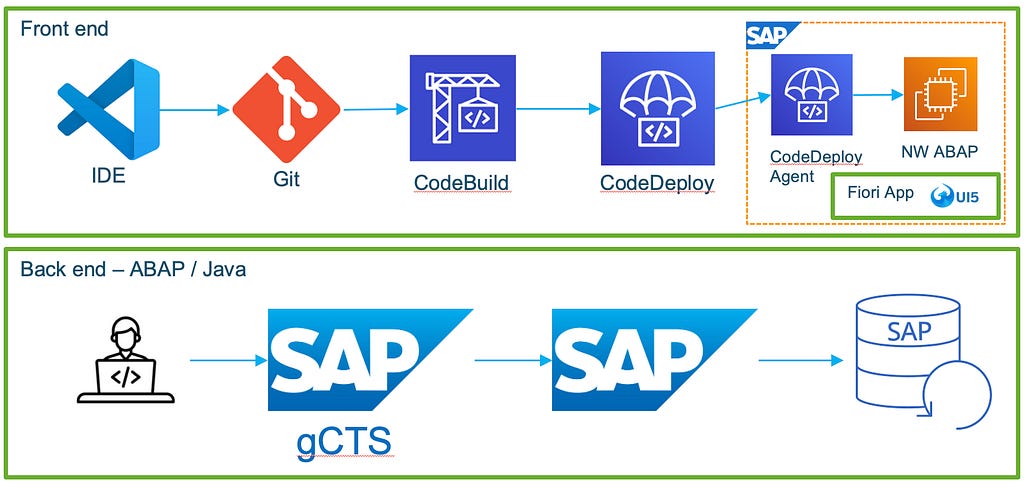
For the frontend development, now we are talking about Javascript-based coding and not ABAP. With Fiori, you can have a pipeline automating your unit, integration and e2e tests, scanning the code and plugging in even Selenium/Jasmine for more mature tests.
For the backend part there’s a new component called gCTS. gCTS allows us to develop outside an SAP Application Server, and therefore storing our code on a Git-based platform, creating pipelines and scanning the code automatically with tools like Sonarqube. Still, no mature deployment strategies are supported or layers of automated tests.
Stack 3 — SAP BTP
SAP BTP is the latest investment of SAP on modernizing the software development on its environments. With BTP, SAP keeps a clean core running, which we don’t have access anymore (as opposed to ECC), and provides a layer of functions (similar to microservices) which can be used during software development to customize behaviors and provide integrations. Let’s take a look at the new flow:
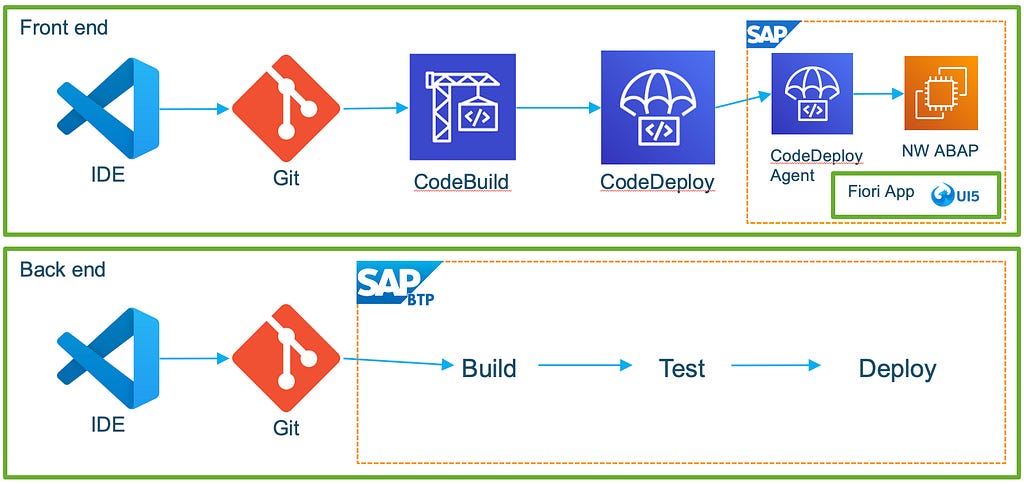
On the frontend using Fiori, there are no changes from the second stack. Now, on the backend flow we have the new capabilities common to modern software development. You can run all the pipelines inside the BTP platform as shown above, but BTP also provides APIs for integrating with third party apps such as Jenkins. On this third stack, Blue/Green deployment is available for the backend as well.
The comparison
Putting all the stacks together and going straight to the point, the table below shows all the stacks and tells us whether each benefit of DevOps can be used:
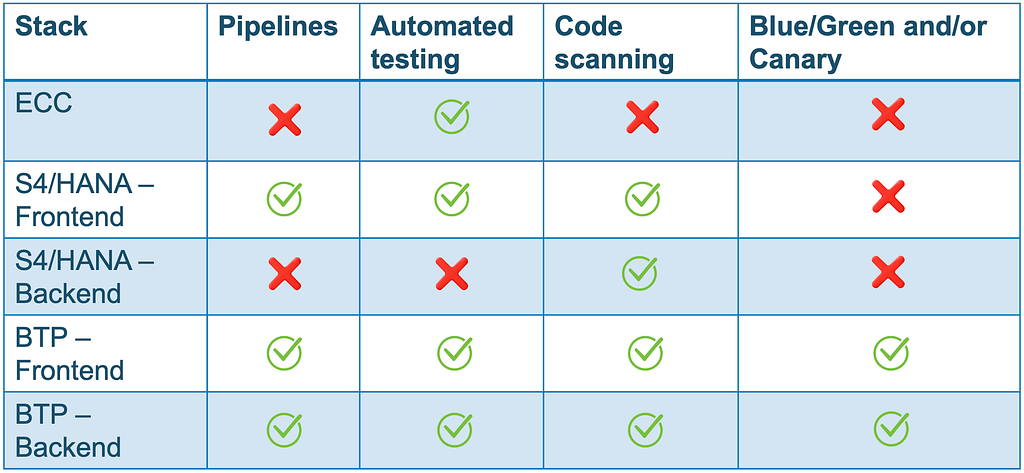
Harnessing the benefits of DevOps is a long journey when we talk about software development inside SAP. The next blog posts are going to approach the DevOps practices that can be achieveed when we look at the infrastructure layer only, and apply it around SAP.